

CF89B.Widget Library
提高+/省选-
通过率:0%
时间限制:2.00s
内存限制:256MB


AC君温馨提醒
该题目为【codeforces】题库的题目,您提交的代码将被提交至codeforces进行远程评测,并由ACGO抓取测评结果后进行展示。由于远程测评的测评机由其他平台提供,我们无法保证该服务的稳定性,若提交后无反应,请等待一段时间后再进行重试。
题目描述
Vasya writes his own library for building graphical user interface. Vasya called his creation VTK (VasyaToolKit). One of the interesting aspects of this library is that widgets are packed in each other.
A widget is some element of graphical interface. Each widget has width and height, and occupies some rectangle on the screen. Any widget in Vasya's library is of type Widget. For simplicity we will identify the widget and its type.
Types HBox and VBox are derivatives of type Widget, so they also are types Widget. Widgets HBox and VBox are special. They can store other widgets. Both those widgets can use the pack() method to pack directly in itself some other widget. Widgets of types HBox and VBox can store several other widgets, even several equal widgets — they will simply appear several times. As a result of using the method pack() only the link to the packed widget is saved, that is when the packed widget is changed, its image in the widget, into which it is packed, will also change.
We shall assume that the widget a is packed in the widget b if there exists a chain of widgets a = _c_1, _c_2, ..., c__k = b, k ≥ 2, for which c__i is packed directly to c__i + 1 for any 1 ≤ i < k. In Vasya's library the situation when the widget a is packed in the widget a (that is, in itself) is not allowed. If you try to pack the widgets into each other in this manner immediately results in an error.
Also, the widgets HBox and VBox have parameters border and spacing, which are determined by the methods set_border() and set_spacing() respectively. By default both of these options equal 0.
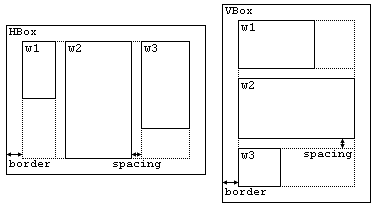
The picture above shows how the widgets are packed into HBox and VBox. At that HBox and VBox automatically change their size depending on the size of packed widgets. As for HBox and VBox, they only differ in that in HBox the widgets are packed horizontally and in VBox — vertically. The parameter spacing sets the distance between adjacent widgets, and border — a frame around all packed widgets of the desired width. Packed widgets are placed exactly in the order in which the pack() method was called for them. If within HBox or VBox there are no packed widgets, their sizes are equal to 0 × 0, regardless of the options border and spacing.
The construction of all the widgets is performed using a scripting language VasyaScript. The description of the language can be found in the input data.
For the final verification of the code Vasya asks you to write a program that calculates the sizes of all the widgets on the source code in the language of VasyaScript.
瓦西娅正在编写一个用于构建图形用户界面的自定义库。他将自己的这个库命名为 VTK(VasyaToolKit)。该库一个有趣的特点是:控件(widgets)可以相互嵌套。
控件(widget)是图形用户界面中的某种元素。每个控件都具有宽度和高度,并在屏幕上占据某个矩形区域。在瓦西娅的库中,所有控件均属于 Widget 类型。为简化起见,我们将控件与其类型视为等同。
类型 HBox 和 VBox 是 Widget 类型的派生类,因此它们本身也属于 Widget 类型。HBox 和 VBox 是两类特殊的控件:它们可以容纳其他控件。这两类控件均提供 pack() 方法,用于将其他控件直接嵌套进自身。HBox 和 VBox 可以存储多个控件,甚至可多次嵌套同一控件——此时该控件将在界面上重复出现。调用 pack() 方法时,仅保存被嵌套控件的引用;因此,当被嵌套控件发生变更时,其在父控件中的显示也会同步更新。
我们称控件 $ a $ 被嵌套进控件 $ b $,当且仅当存在一个控件序列 $ a = c_1,,c_2,,\dots,,c_k = b $,其中 $ k \geq 2 $,且对任意 $ 1 \leq i < k $,均有 $ c_i $ 直接被嵌套进 $ c_{i+1} $。在瓦西娅的库中,不允许出现控件 $ a $ 被嵌套进其自身(即 $ a $)的情形;若尝试如此嵌套,将立即引发错误。
此外,HBox 和 VBox 还具有两个参数:border(边框)与 spacing(间距),分别通过方法 set_border() 和 set_spacing() 设置。这两个参数默认值均为 0。
上图展示了控件在 HBox 和 VBox 中的嵌套方式。HBox 和 VBox 会根据所嵌套控件的尺寸自动调整自身大小。二者唯一的区别在于:HBox 水平排列其内部控件,而 VBox 则垂直排列。参数 spacing 指定相邻控件之间的距离,border 则指定环绕所有嵌套控件的边框宽度。嵌套控件在界面上的排列顺序严格对应其调用 pack() 方法的先后顺序。若 HBox 或 VBox 内未嵌套任何控件,则其尺寸恒为 $ 0 \times 0 $,与 border 和 spacing 的取值无关。
所有控件的构造均通过一种脚本语言 VasyaScript 实现。该语言的语法说明详见输入数据部分。
为最终验证代码正确性,瓦西娅请你编写一个程序,根据 VasyaScript 源代码计算出所有控件的尺寸。
输入格式
The first line contains an integer n — the number of instructions (1 ≤ n ≤ 100). Next n lines contain instructions in the language VasyaScript — one instruction per line. There is a list of possible instructions below.
- "Widget [name]([x],[y])" — create a new widget [name] of the type Widget possessing the width of [x] units and the height of [y] units.
- "HBox [name]" — create a new widget [name] of the type HBox.
- "VBox [name]" — create a new widget [name] of the type VBox.
- "[name1].pack([name2])" — pack the widget [name2] in the widget [name1]. At that, the widget [name1] must be of type HBox or VBox.
- "[name].set_border([x])" — set for a widget [name] the border parameter to [x] units. The widget [name] must be of type HBox or VBox.
- "[name].set_spacing([x])" — set for a widget [name] the spacing parameter to [x] units. The widget [name] must be of type HBox or VBox.
All instructions are written without spaces at the beginning and at the end of the string. The words inside the instruction are separated by exactly one space. There are no spaces directly before the numbers and directly after them.
The case matters, for example, "wiDget x" is not a correct instruction. The case of the letters is correct in the input data.
All names of the widgets consist of lowercase Latin letters and has the length from 1 to 10 characters inclusive. The names of all widgets are pairwise different. All numbers in the script are integers from 0 to 100 inclusive
It is guaranteed that the above-given script is correct, that is that all the operations with the widgets take place after the widgets are created and no widget is packed in itself. It is guaranteed that the script creates at least one widget.
第一行包含一个整数 n —— 指令的数量(1≤n≤100)。接下来的 n 行包含 VasyaScript 语言的指令,每行一条指令。可能的指令列表如下:
Widget [name]([x],[y])—— 创建一个名为[name]的Widget类型新控件,其宽度为[x]单位,高度为[y]单位。HBox [name]—— 创建一个名为[name]的HBox类型新控件。VBox [name]—— 创建一个名为[name]的VBox类型新控件。[name1].pack([name2])—— 将控件[name2]打包进控件[name1]中。此时,控件[name1]必须是HBox或VBox类型。[name].set_border([x])—— 将控件[name]的边框参数设为[x]单位。控件[name]必须是HBox或VBox类型。[name].set_spacing([x])—— 将控件[name]的间距参数设为[x]单位。控件[name]必须是HBox或VBox类型。
所有指令字符串首尾均无空格。指令内部的单词之间恰好由一个空格分隔。数字前后均无空格。
大小写敏感,例如 wiDget x 不是合法指令。输入数据中字母的大小写是正确的。
所有控件名称均由小写拉丁字母组成,长度为 1 至 10 个字符(含端点),且所有控件名称两两不同。脚本中所有数字均为 0 至 100(含端点)之间的整数。
保证上述脚本合法,即所有对控件的操作均发生在该控件创建之后,且不存在将某个控件打包进其自身的操作。保证脚本至少创建一个控件。
输出格式
For each widget print on a single line its name, width and height, separated by spaces. The lines must be ordered lexicographically by a widget's name.
Please, do not use the %lld specificator to read or write 64-bit integers in C++. It is preferred to use cout stream (also you may use %I64d specificator)
对每个控件,单独一行输出其名称、宽度和高度,三者之间用空格分隔。各行必须按照控件名称的字典序排列。
请注意,在 C++ 中请勿使用 %lld 格式说明符来读取或写入 64 位整数。推荐使用 cout 流(也可使用 %I64d 格式说明符)。
输入输出样例
输入#1
12
Widget me(50,40)
VBox grandpa
HBox father
grandpa.pack(father)
father.pack(me)
grandpa.set_border(10)
grandpa.set_spacing(20)
Widget brother(30,60)
father.pack(brother)
Widget friend(20,60)
Widget uncle(100,20)
grandpa.pack(uncle)
输出#1
brother 30 60
father 80 60
friend 20 60
grandpa 120 120
me 50 40
uncle 100 20
输入#2
15
Widget pack(10,10)
HBox dummy
HBox x
VBox y
y.pack(dummy)
y.set_border(5)
y.set_spacing(55)
dummy.set_border(10)
dummy.set_spacing(20)
x.set_border(10)
x.set_spacing(10)
x.pack(pack)
x.pack(dummy)
x.pack(pack)
x.set_border(0)
输出#2
dummy 0 0
pack 10 10
x 40 10
y 10 10
说明/提示
In the first sample the widgets are arranged as follows:
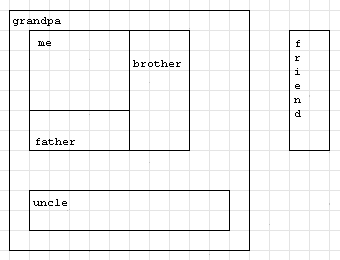
在第一个样例中,小部件的排列方式如下:
输入解题思路,AI测评打分。不知道怎么写?